- / Services
- / Change management in Microsoft 365 projects
Most powerful knowledge management solutions
Solu Digital provides knowledge management and analysis models for today’s complex businesses.
Change management in Microsoft 365 projects
Change management is not a separate project – it is part of every delivery
Microsoft 365 solutions are not just technology projects. Every implementation changes the way work is done, the structures of collaboration and the management of information.
Many Microsoft 365 projects focus on implementation, even though the real change happens afterwards. Without planned change management, the new environment can easily remain underutilized.
We help ensure that change takes hold in everyday work. Change management is part of the delivery, with new ways of working built alongside the technical solution.
Yhtenäinen hallinta Microsoft 365 -ympäristöön
Yhä useampi organisaatio hyödyntää Microsoft 365 -ympäristöä laajasti, mutta ilman yhtenäisiä toimintaperiaatteita järjestelmä voi muuttua sekavaksi. Tiedon löytäminen vaikeutuu, ja rinnakkaisia työtiloja syntyy helposti. Hallintamalli luo rakenteen, joka auttaa pitämään kokonaisuuden hallinnassa ja mahdollistaa sujuvan yhteistyön eri tiimien välillä.
Selkeästi määritellyt roolit ja käyttöoikeudet vähentävät riskejä ja varmistavat, että oikea tieto on oikeilla henkilöillä. Samalla hallintamalli tukee asiakirjahallinnan ja tiedon elinkaaren prosesseja – esimerkiksi yhdistämällä dokumenttien hallinnan, työryhmien hallinnan ja asiakirjamallien automaation yhdeksi johdonmukaiseksi kokonaisuudeksi.
Implementation alone does not change the way work gets done
Organizations invest in Microsoft 365 solutions because they enable more efficient collaboration, better information management, and better visibility into how work is done. However, the benefits do not automatically arise with implementation.
Without jointly agreed ways of working, solutions are implemented, but the way work gets done does not change.
The role of change management is to ensure that the organization moves to a new way of working – not just a new system.
Change is built during the delivery
Change management is often delivered as a separate workstream after implementation. In that case, changes to ways of working can easily remain disconnected from the solution. In Solu Digital deliveries, change is built in during the implementation phase, so that technology and everyday practices develop at the same time.
Change management is not a separate entity in all projects, but its importance is emphasized especially when the goal is to develop collaboration, clarify work, or widely deploy a solution. In this case, user involvement, defining common practices, and supporting daily work play a key role.
When change management is involved in the delivery, the end result is not just a deployed solution, but a clear and consistent way of working that supports business goals.
”Parasta Solu Digitalin kanssa yhteistyössä on ollut joustavuus ja heidän kykynsä päästä sisälle meidän toimintaamme – tämän valmiin järjestelmän sovittamiseen niihin meidän tarpeisiin.”
“Solu Digitalin referenssit ja ymmärrys tarpeistamme tekivät vaikutuksen meihin ja näin ollen myös laajemmat Office 365 -ratkaisut astuivat kuvioon. Päätös yhteistyöstä Solu Digitalin kanssa syntyi nopeasti.”
Ways of working are built together
Change management becomes concrete through practical work, where the current state, goals and everyday practices are brought together as part of the delivery.
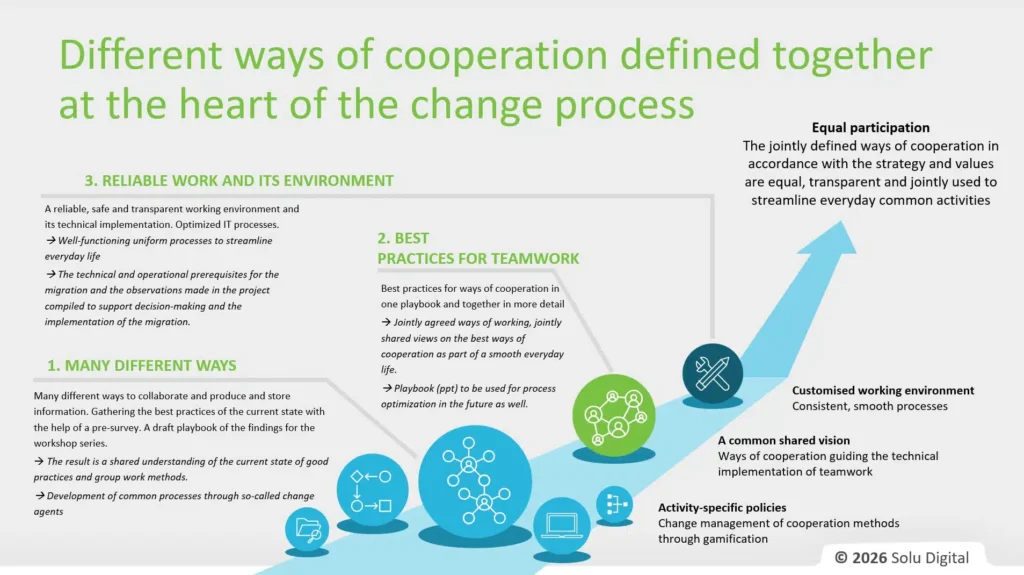
Development work begins with a survey of the current state. The organization’s ways of working, practices and pain points are identified, for example, through preliminary surveys and interviews. At the same time, existing practices are identified that can be built on.
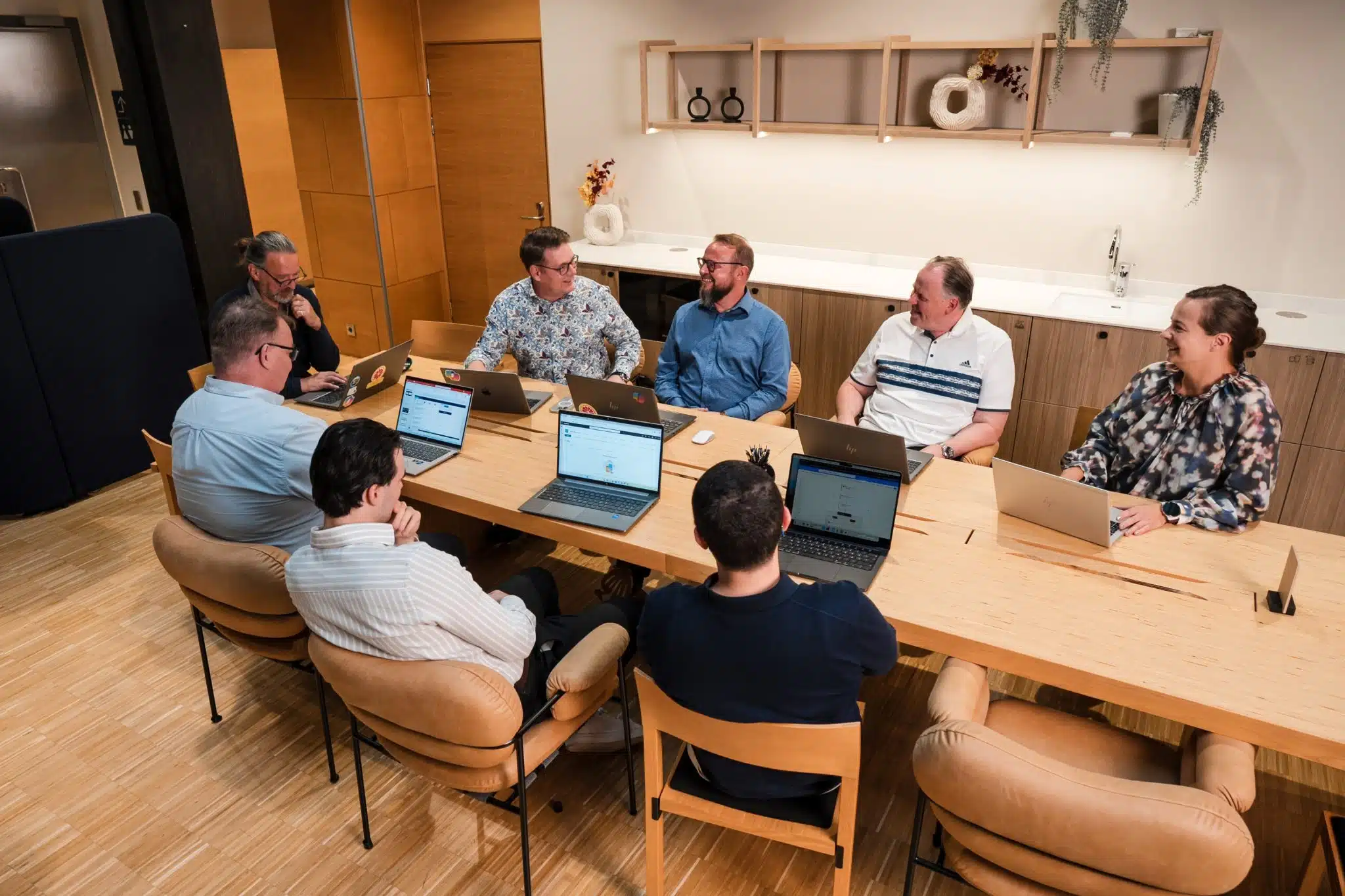
A shared way of working is defined through workshops. Representatives from different teams and units are involved, which helps ensure that the ways of working are realistic and that the organization commits to them broadly. The goal is to create clear, consistent practices that support everyday work in the Microsoft 365 environment.
Solutions are often implemented in a pilot phase with a limited group of users. The pilot enables testing of ways of working, collecting feedback and making necessary refinements before wider implementation.
Aligning technology and practices ensures that the environment supports the agreed way of working. Solutions are built to meet everyday needs, not just technical requirements.
Rollout and continuous development ensure that change does not remain confined to the project phase. Ways of working continue to evolve based on real usage even after implementation.
The key outcome is a playbook that compiles agreed practices, roles and ways of working and supports day-to-day work.
Concrete results delivered during the project
Change management produces clear results that the organization can use even after the project.
The delivery includes an analysis of the current state, facilitation of workshops, and the definition of a shared way of working. The key result is a playbook that compiles agreed practices and serves as a continuous guideline.
In addition, key people in the organization who support the rollout of change in daily work are identified and involved. The delivery also includes recommendations on the structures and practices of the Microsoft 365 environment.
Benefits are visible in everyday work
Change management helps ensure that real benefits are derived from your Microsoft 365 investment.
Management gains better visibility into how the change is progressing when goals, agreed-upon practices, and the status of the implementation are reviewed during the project. Decision-making is based on an up-to-date picture of the situation.
The business benefits when ways of working are agreed together and embedded in everyday work. Ambiguities are reduced and collaboration flows smoothly across team boundaries.
IT gains a more controlled implementation when users have a clear understanding of how solutions are used and for what purpose. There are fewer support requests and the implementation progresses more smoothly.
Change management determines project success
Change management is particularly linked to the development and implementation of Microsoft 365 environments, where ways of working change at the same time as the technology. Implementation alone is not enough. If ways of working remain undefined or vary between teams, the solution will not deliver its intended value.
Typical situations include Microsoft 365 implementations, clarifying Teams and SharePoint structures, and implementing Solu 365 solutions. In addition, the service supports the development of project models and ways of working, so that work is consistent and runs smoothly without unnecessary complexity or ambiguity.
Change management can also be used in the implementation of other solutions when the implementation affects collaboration, information management, or work organization.
Change is built alongside the solution
Change management often remains at the planning level if it is separated from the actual implementation. In our deliveries, change is built into the work itself, so that a new way of working takes shape alongside the solution.
Solutions are designed to support daily work, not just the system.
Ensure successful change
A successful Microsoft 365 project does not end with implementation. Value is only created when the new way of working becomes embedded in the organization’s everyday work.
Book a meeting to assess where change should be built into your next Microsoft 365 project.
Asiakkaidemme kokemuksia
Juha Nevalainen
Scania Suomi Oy • Myyntijohtaja Sopimusliiketoiminta

4.0
Esa-Ville Vanhatupa
Turun kaupungin IT-palvelut • Projektipäällikkö

5.0
Parasta yhteistyössä Solu Digitalin kanssa on, että heidän kanssaan on helppo tehdä yhteistyötä ja kaikki sujuu mutkattomasti, nopeasti ja ilman ongelmia.
Juha Sarsama
Panostaja • Toimitusjohtaja
Solu Digitalin referenssit ja ymmärrys tarpeistamme tekivät vaikutuksen meihin ja näin ollen myös laajemmat Office 365 -ratkaisut astuivat kuvioon. Päätös yhteistyöstä Solu Digitalin kanssa syntyi nopeasti.
Kristian Hartikainen
Business Finland • Senior Advisor

5.0
Parasta on varmaan ollut tässä yhteistyössä se joustavuus. Solu Digital on yllättävän hyvinkin joustanut sitä, että olemme kiireisiä ja meillä on paljon kilpailutuksia koko ajan, mutta samanaikaisesti olemme pystyneet kehittämään hankintasalkkua.
Mikko Tätilä
Forendo Pharma • Information Technology Manager
Kokemus yhteistyöstä positiivista, asiakaslähtöistä ja mutkatonta.
Seppo Perkiö
HSL Helsingin Seudun Liikenne • Tietohallintopäällikkö
Solu Digital valikoitui toimittajaksi sillä yrityksellä on vahvat näytöt ketterien salkunhallintajärjestelmien toteutuksista.
Peter Krause
Transmeri • ICT- ja digitaalisten palveluiden kehityspäällikkö
Solu Digitalin asiantuntijoiden asiakasymmärrys on huippuluokkaa! Ikinä ei tarvitse vääntää rautalangasta sitä, mitä haemme, vaan asiantuntijamme ymmärtävät heti meidän maailmastamme käsin, mitä tarvitsemme ja mikä tukee liiketoimintaamme.
Tarja Ihalainen
Teknologiateollisuus ry • Jäsenpalvelupäällikkö
Läpinäkyvyys on auttanut meitä seuraamaan edistymistä ja varmistamaan, että kaikki työntekijät ovat tietoisia yhteisistä päämääristä.
Inessa Taneli
Sako Oy • Projektipäällikkö
Lauri Eskola
SSAB • Application Manager
Inessa Taneli
Sako Oy • Projektipäällikkö
Jere Penttinen
Boliden Kokkola • Investointipäällikkö
Lasse Palminen
Keskisuomalainen • Tietohallintojohtaja
Ann Heinonen
NRC Group • IT Service Manager
Jani Luoma
Pääkaupunkiseudun Junakalusto Oy • Kalustojohtaja
Marko Salmi
Boliden Kokkola • Digitalisaatiopäällikkö
Esa-Ville Vanhatupa
Turun kaupungin IT-palvelut • Projektipäällikkö
Check out our customer stories
Read more articles by our experts

How to lead change in everyday work – 5 tips for successful change
Change rarely fails because of strategy. More often, it fails in the way it is implemented in everyday work. Success depends on how well people understand, experience and adopt new ways of working as part of their daily routines.

AI and voice control in field work
Voice control and AI bring reporting into field work. Data is captured during the job, improving visibility, decision-making, and workflow efficiency without separate data entry.

Copilot in PowerPoint – 5 tips for more effective AI-powered presentations
Microsoft 365 Copilot in PowerPoint speeds up presentation creation and helps you develop content step-by-step. Take advantage of five practical tips for improving structure, slides, and messaging.