
The Solu 365 automation tool guarantees consistent management of projects and project resources in your organization transparently and securely.
The Solu 365® automation tool helps you manage projects, workspaces, and project documents smoothly. The comprehensive solution concentrates all information, tools, and colleagues in Microsoft Teams’ project-specific workgroups.
The tool helps to create projects automatically with a simple, fast, and efficient process in a secure way. You only need to define the basic information for the project using an easy creation form or through integration, either using Power Platform tools or over the actual programming interfaces, when you want to import the project’s basic information from back-end systems.
Solu 365 automatically, transparently, and faultlessly creates the data tools necessary for the use of the project in the Microsoft 365 and Project for the Web environments based on the basic information given to it.
A comprehensive tool for all project work needs
The Solu 365® automation tool helps you create workgroups suitable for different purposes, such as internal projects and projects with external partners.
Resources are defined for projects, such as:
- Planner Premium project resources for managing individual projects and project portfolios
- The structure of Teams channels and, for example, a private channel for the steering group
- folder structure of documents
- ready-made document templates such as Word, Excel, and PowerPoint files, for instance, for reports or minutes of meetings, which ensures a uniform way of working throughout the organization
- project-specific time recording items for the electronic worktime recording application
- resourcing application for planning, allocating, and reporting the use of the working time of project team members
- tools such as OneNote notes
- an optional due date for archiving the group, if necessary, for example when the project ends.
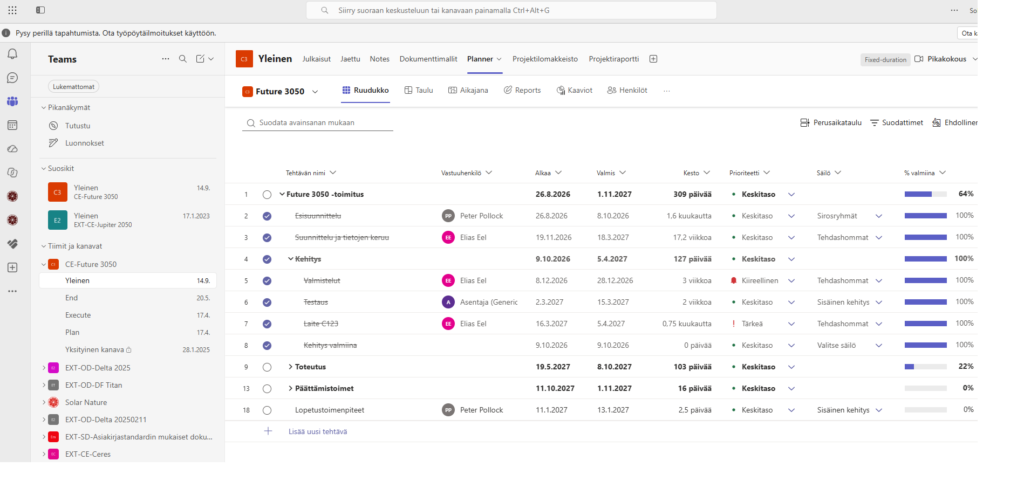
Every project created with the Solu 365 tool with all its resources gets its metadata, which is automatically displayed in all documents. Metadata helps you to find the right information easily and quickly and to use the information at the right time, exactly when you need it.
In addition to the project-specific metadata, the document template metadata is also stored in the new document when the automation tool utilizes the project’s ready-made document templates. Using the tool reduces the amount of manual work and the risk of human errors, while you can focus on handling other work tasks.
Project activities following the uniform practices of the organization and compliance with naming and recording practices are ensured with the help of an automatically controlled project, workgroup, and document management process. The quality and consistency of information improve when all employees can easily create documents in line with the organization’s brand.
Resource management and electronic time recording with the Solu 365 tool
Resourcing’s light application in Teams helps to plan and allocate the working time of project team members. If necessary, the application can be used per team or more broadly, in which case the application considers the use of working time in other projects as well. This information can be added to the reports as well.

Solu 365’s electronic time recording application automatically retrieves information for the time recording form from, for example, Microsoft’s Project for the Web (PfW) environment for project tasks. In this case, the users can record their hours immediately after the creation of the project and related resources.
It is possible to attach the electronic approval cycle to hourly recordings, if necessary.
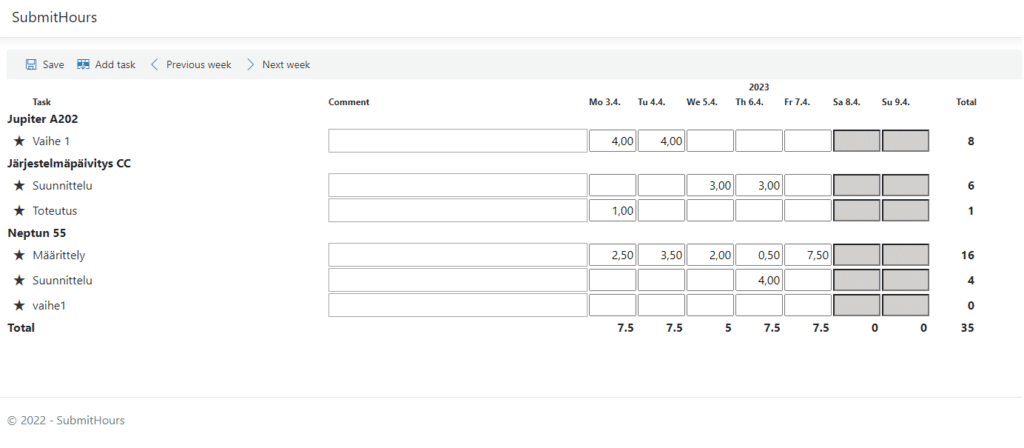
Hourly records stored in the Azure database can be added to Power BI reports, which can also be combined with information from other sources, such as, for example, people’s cost center information from the HR system. The report can be viewed for the desired period, for example by project or by person, which makes it easier to track the completed hours.
Snapshot of projects in Solu 365 Portfolio
The teams in Microsoft Teams formed for projects are displayed up-to-date in the Solu 365 Portfolio. It makes it easier to navigate to Teams groups and other Microsoft 365 services and to manage the project teams you own.
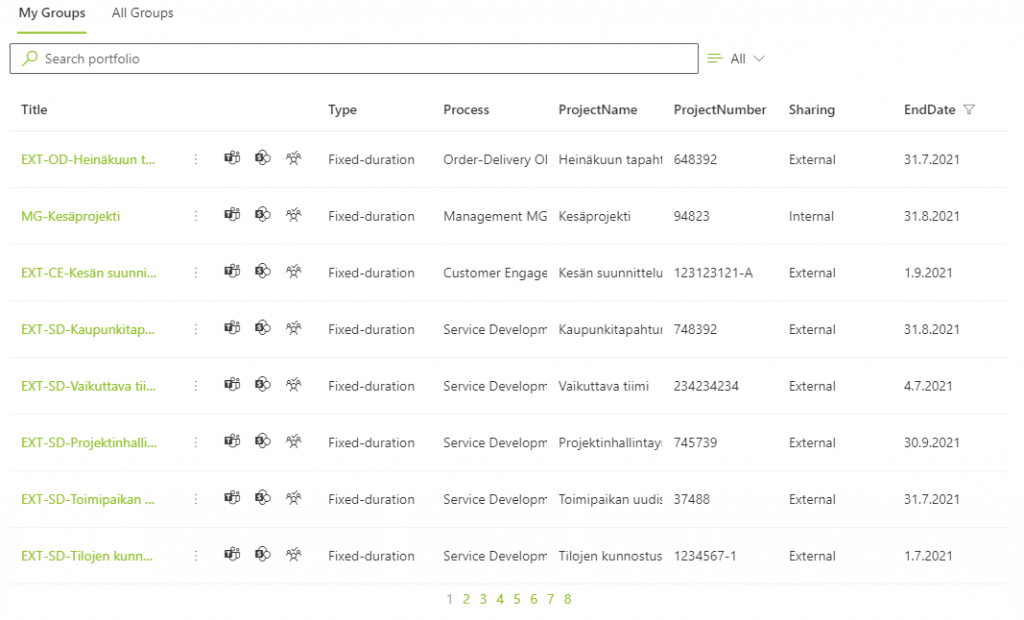
With the help of project and workgroup automation and the portfolio view of workgroups:
- Project management, project communication, reporting, and information and document management are focused on Microsoft Teams, which facilitates and speeds up project work.
- Maintenance of the project’s basic information, user management of the project team members, as well as archiving and deleting the team can be done easily through Solu 365.
- Findability, manageability, and transparency of information and documents are improved through a simple and clear project creation process.
- The management of projects and project documents are harmonized according to the uniform practices of the organization.
- Data security is improved as the access of external users is limited to certain Teams groups and folders.
Save time and make your work more efficient with Solu 365 helping you manage your organization’s projects and related information, from documents and other resources to time recording and project reporting.
Henry Scheinin
Leading consultant, Partner
Download the project management guide
Download our guide to smooth project management and make your organization’s project work easier. Leave your contact information and we will send the guide to your email.